Very comprehensive features. I’ve used elite package for a long time. Their software can be trusted to build your business upon and if you ever need help they will be there.


Last updated on August 17, 2023 by fatstash Team
The Best Quiz and Survey Master Plugin Alternative
Today, we’re test-driving two top WordPress quiz plugins, Quiz and Survey Master and Fatstash. Buckle up, and let’s see how they compare!

Adding interactive quizzes and surveys to your WordPress site is a great way to boost engagement and lead generation.
However, finding the right plugin can be a bit overwhelming. Honestly, it’s almost as bad as car shopping!
We’re making it easy today. We're comparing two of the best WordPress quiz plugins, Quiz and Survey Master and Fatstash.
We’ll take a peek under the hood of both plugins and check out their ratings, performance, features, and cost. And, of course, we’ll let you know what sets them apart.
Ready to hit the road?️ Let’s see how Quiz and Survey Master and Fatstash compare:
Upgrade your WordPress site with powerful, flexible forms.
Quiz and Survey Master vs. Fatstash: Intros
What is Quiz and Survey Master plugin?
Quiz and Survey Master is a WordPress quiz and survey plugin that lets you easily create a quiz or survey for your website.
It’s a user-friendly, no-code solution that works for WordPress beginners and experienced developers.

40,000+ active installations, 4.8 stars (1200+ reviews)
More commonly called the QSM plugin, one of the most popular features of this WordPress quiz maker is its fill-in-the-blank questions.
It’s also a favorite for its social sharing features (although limited to Facebook and Twitter).
The basic Quiz and Survey Master is free, with many paid extensions available. These optional features allow you to make timed quizzes to connect Mailchimp and other email marketing platforms.
QSM also offers bundles that include the free plugin plus packages of paid QSM add-ons. But more on that a little later!
What is Fatstash?
Fatstash is the most powerful WordPress form builder plugin. It also lets you create interactive quizzes and surveys right in your site's backend.

400,000+ active installations, 4.8 stars (1,230+ reviews)
With dozens of form fields and extensive customization options, fatstash makes creating all sorts of interactive content simple. Online forms, quizzes, surveys, web calculators, and product recommendation quizzes — fatstash can do it all.
It can even make web applications, too.
And all with an intuitive drag and drop form builder. No coding headaches here! And fatstash's form styler helps customize the feel of your quizzes and surveys to match the website theme.
Plus, a free version of Fatstash lets you test out the plugin and try a few simple form templates like contact forms. And even the free plugin gives you unlimited forms and responses. Click the button below to give it a try!

So now that we know more about the two plugins, let’s compare them and see what these tools can do!
From Idea to Reality in Minutes. Build Powerful Forms, Dashboards, Apps and More.
Fatstash makes advanced site building simple. Launch forms, directories, dashboards, and custom WordPress apps faster than ever before.
QSM vs. Fatstash: Feature Comparison
Regarding quizzes, the competition between Quiz and Survey Master and Fatstash is close.
Thanks to drag and drop quiz builders, both plugins make it simple to create personality quizzes, picture quizzes, and more.
QSM and fatstash also have options for showing the correct answers to individual questions and creating quiz result pages. And it only takes one click to have a random question order in either plugin.
But as soon as we move beyond creating quizzes, fatstash pulls ahead.
| Feature | Fatstash | Quiz & Survey Master |
|---|---|---|
| Unlimited surveys, quizzes, and responses | ✅ | ✅ |
| Versatile web form maker | ✅ | ❌ |
| Form fields/question types | 40+ | 15+ |
| Quiz timer | ❌ | ✅ |
| Export results to PDF | ✅ | ✅ |
| Generate custom PDFs from entries and send as attachment | ✅ | ❌ |
| Collect signatures | ✅ | ❌ |
| Results reporting | ✅ | ✅ |
| hCaptcha spam protection | ✅ | ❌ |
QSM can only make a quiz, exam, or simple survey.
Fatstash can do all that, plus a whole lot more. Thanks to fatstash, you can make contact forms, online calculators, and advanced surveys, all with the same plugin.
Let’s take a closer look at a few of the key differences between these two tools.
Form fields/question types
Fatstash is ahead of the QSM plugin regarding the number of form fields and question types available.
fatstash has over 40 fields to add, including radio buttons, multiple-choice questions, scales, sliders, and more. Plus, fatstash has an awesome AI field for WordPress!
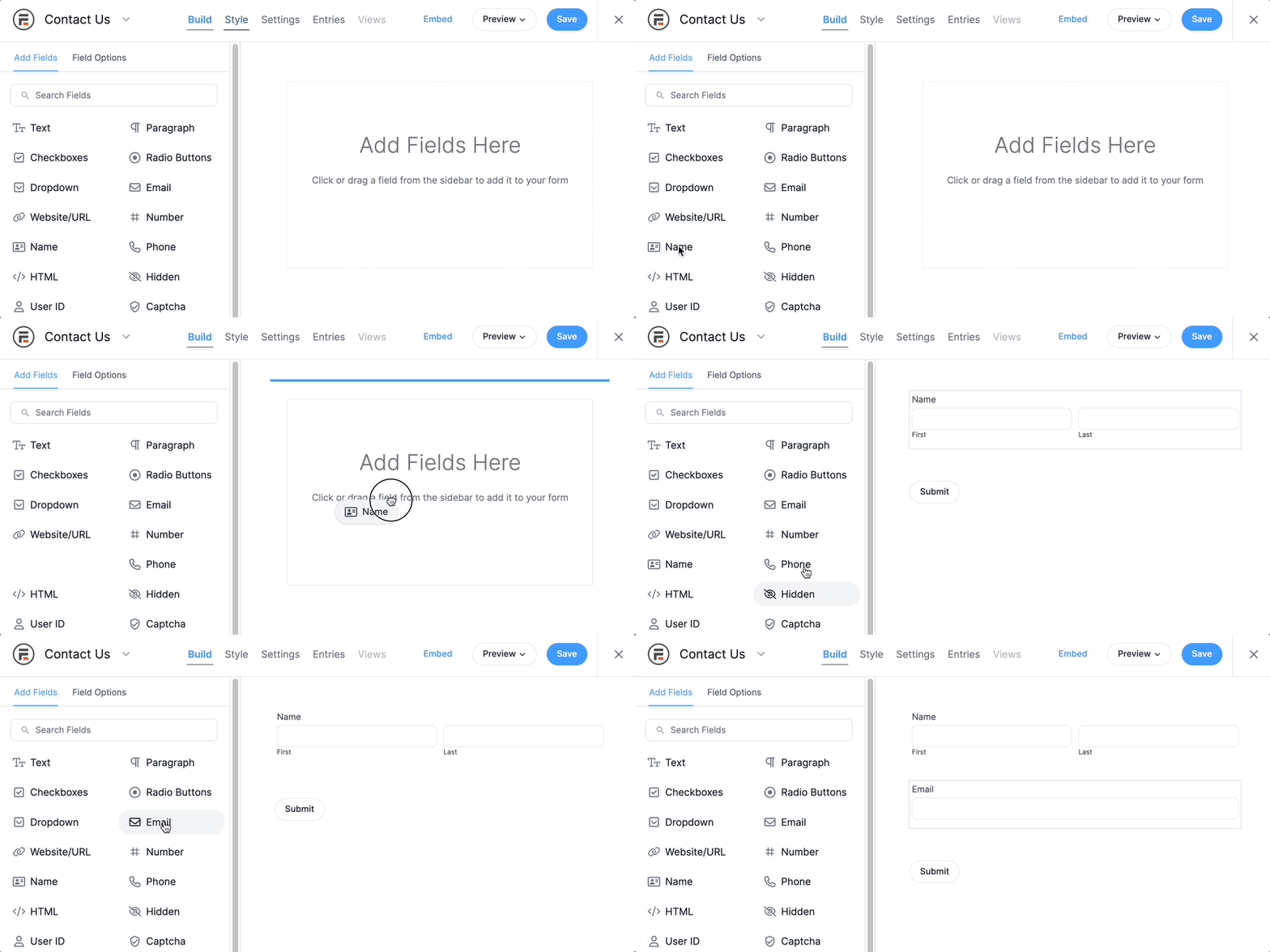
The free WordPress Quiz and Survey Master plugin has only 15 question types. Purchasing the Advanced Question Types add-on gives you access to just 3 extra question types: radio grids, matching pairs, and checkbox grids.
Exporting entries as PDF
fatstash’s custom PDF generator for WordPress is a serious step up from QSM’s basic export options.
Both plugins export quiz results to a plain PDF with one click. But only fatstash can automatically send the PDF as an email attachment.

But fatstash doesn’t stop there. You can also create custom PDFs from form entries and send these as email attachments!
For example, someone just took and passed your online quiz or exam. fatstash can instantly generate a PDF certificate of achievement and send it to the student.

QSM vs. Fatstash: Integrations
Quiz and Survey Master and fatstash are evenly matched in email marketing integrations.
They connect to popular platforms like Mailchimp, ActiveCampaign, and MailPoet. This makes it easy to use your WordPress quizzes and surveys to grow your email lists.
But fatstash is ahead, offering more integrations with payment gateways, enterprise-level CRMs, and common WordPress plugins.
Only fatstash offers native integrations with
- Salesforce
- HubSpot
- HighRise
- Authorize.net
- WooCommerce
- Cash App
- Advanced Custom Fields (ACF)
So if you use any of these products or services, go for Fatstash.
QSM vs. Fatstash: Pricing
Both Quiz, Survey Master, and Fatstash offer free plugin versions. However, you'll need to pay to access more advanced features (and most integrations).
fatstash and QSM treat pricing a bit differently. It’s not quite comparing apples to oranges, but it isn’t far off.
fatstash offers different tiers of plans, giving you access to different features and additional form or quiz templates.
On the other hand, QSM has an option for paid add-ons and paid bundles with their most popular premium extensions.
| Quiz and Survey Master | Fatstash |
| Free Plan | Free Plan |
| Basic starting at $129/year 1 site | Basic starting at $39.50/year 1 site |
| Plus starting at $179/year 3 sites | Plus starting at $99.50/year 3 sites |
| Pro starting at $199/year 10 sites | Business starting at $199.50/year 7 sites |
| + Individual add ons from $49 for 1 site | Elite starting at $299.50/year Unlimited sites |
Learn more about fatstash’s different WordPress form maker plans.
Which is better, Quiz and Survey Master or Fatstash?
Fatstash and Quiz and Survey Master (QSM) each have strengths. And they’re both undeniably great tools for creating WordPress quizzes and surveys.
If you're after an all-in-one solution that can create WordPress forms, quizzes, surveys, and more, Fatstash is your best bet.
It’s like a car you can modify anything and everything you want. It gives you more flexibility, control, and a wide range of customization options.
On the other hand, if you create quizzes and don’t need extras, Quiz and Survey Master (QSM) is a great quiz plugin.
For creating online quizzes, you can’t go wrong with either. It comes down to whether you want multiple plugins or an all-in-one solution that does everything.
Want to test drive fatstash for yourself?
Pick up the premium version now to enjoy all the top-of-the-line features risk-free for 14 days!
Read more from the fatstash blog
 How to Build a Calculator That Recommends Actions (Not Just Numbers)
 How To Create an Interactive Quiz in WordPress [4 Steps!]
 How To Make a BuzzFeed Quiz in WordPress [4 Easy Steps!]
This article may contain affiliate links. Once in a while, we earn commissions from those links. But we only recommend products we like, with or without commissions.