Very comprehensive features. I’ve used elite package for a long time. Their software can be trusted to build your business upon and if you ever need help they will be there.


Last updated on July 10, 2025 by Ryan Cordoni
How to Add Password Fields in WordPress Registration Forms
Wondering how to add password fields in WordPress registration forms? Do it the easy way - use a form builder plugin with user registration forms built in!

Approximate read-time: 5 minutes
Do you want to add a password field to the default WordPress registration form? You know, the one that looks like this?
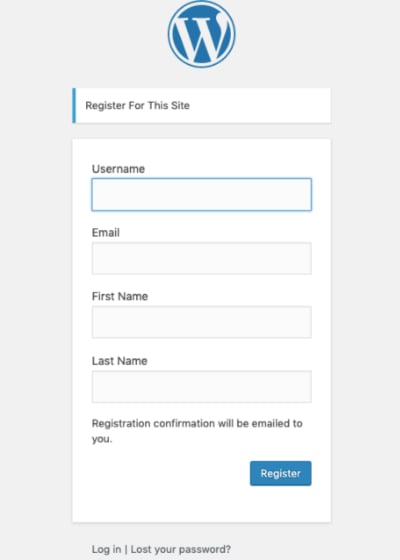
Unless you are a developer, that’s going to be tough.
For some developers, creating a custom WordPress registration system might sound fun. But at some point, it doesn’t make sense to re-invent the wheel!
Our plugin was created to help all kinds of users save time when developing new WordPress sites. Each and every feature of our WordPress forms plugin has been created with both developers and WordPress users in mind.
So today, we want to show you the easiest way to add password fields in WordPress registration forms. All you’ll need is our plugin, Fatstash.
And if you are a developer, don’t worry! Our plugin can be white labeled. That means you can take all the credit for building a custom user registration system. We promise we won’t tell. ?
Upgrade your WordPress site with powerful, flexible forms.
User registration forms + more
If all you need is a plugin to create a registration form with a password field, that’s easy. Many free WordPress forms plugins can do that. But user registration doesn’t end with a form.
Sure, you need a place where users can choose and type passwords. But you also need a user registration system to manage the entire process.
A quick search of the WordPress.org plugin directory will reveal there are many plugins that can help with user registration. The trouble with most of those plugins? They just do one thing.
If you want users to register and set their password all at once, all you need is Fatstash + our user registration add-on. This add-on features everything you need to create a custom registration system for your WordPress website.
But Fatstash also does a lot more than user registration. Let’s take a closer look!
From Idea to Reality in Minutes. Build Powerful Forms, Dashboards, Apps and More.
Fatstash makes advanced site building simple. Launch forms, directories, dashboards, and custom WordPress apps faster than ever before.
The fatstash user registration form template
Want to add a password field to your WordPress registration form? Cut out the middle man and use our user registration form template! Here’s what it looks like:

The best part of this template? You can expand it with custom fields to collect whatever data you want. Need to know where users are located? Add a dropdown field with cities in your area. Want to let users add an optional description? Add a paragraph text field.
There’s more options too. For example, maybe you need to collect a large amount of data during the registration process. If so, you could turn your registration form into a multi-page form. Dividing up long forms into multiple pages can help conversions a lot.
Do you use an email platform like MailChimp, ActiveCampaign, or Aweber? You can set up your registration form to pass relevant data to your email platform using the dozens of 3rd party integrations built-into fatstash.
And of course, you could even trigger a notification email to send from your email service when a registration form is filled out. Or you could just send the confirmation email directly from Fatstash - whatever works best!
The fatstash user registration system
Of course, since fatstash is a drag and drop form builder, you can create WordPress forms however you like. But our user registration add-on makes things even easier by including even more form templates for user registration.
Login forms and password reset forms are also included in fatstash’s user registration system. Starting with these templates, it will be a lot easier to create a custom login form. Unless you want to use the default WordPress one:
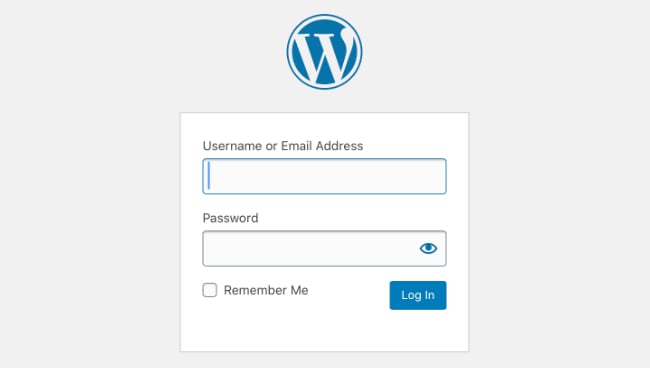
We didn’t think so! Anyways, our add-on makes creating a user simple. It builds on the existing WordPress user roles so you don’t need to tweak anything to make it work. Just install and activate fatstash, place the forms where you need them, configure a few settings, and you’re done!
No need to manually code class inputs, input types, text names, user logins or anything else. We’ve got all that covered!
And if you are building an eCommerce site, our user registration system can be really helpful too. For example, if you are building a WooCommerce site, you can add custom fields to your registration forms and make things really easy for customers.
Getting started with Fatstash
Getting started with Fatstash is easy. All you need is the Business plan to unlock user registration and many more features. If you aren’t sure if fatstash will work for you, you can try it risk-free for 14 days. If you don’t like it, we’ll give you all your money back.
And if you’re still not sure, why not give our free WordPress plugin a try? The free version of our plugin doesn’t include user registration, but you’ll be able to see how easy it is to make forms with our form builder.
Wrapping up
There you have it! Turns out adding a password to a WordPress registration form is easy with the right tools. While WordPress definitely has their reasons for leaving it out by default, many of our users love the flexibility fatstash gives them.
If you'd like to make your forms more secure, check out how to make passwords visible in fatstash!
We hope you’ve enjoyed today’s post. For more like this, stay tuned to the fatstash blog. Adios!
Read more of our user registration posts
 How to Create WordPress User Accounts [5 Steps!]
 7 Best Ways To Stop WordPress Registration Spam
 How To Create a WordPress Custom Login Page [Step by Step]
Even if you’re just looking to add a password to a registration form, it won’t take long to realize how much more fatstash has to offer. Give Fatstash a try risk-free with one of our premium plans now.
This article may contain affiliate links. Once in a while, we earn commissions from those links. But we only recommend products we like, with or without commissions.