Very comprehensive features. I’ve used elite package for a long time. Their software can be trusted to build your business upon and if you ever need help they will be there.


Last updated on September 5, 2023 by fatstash Team
5 Typeform Survey Examples... That Don't Use Typeform!
Want to make great conversational forms that convert? Let's look at some top Typeform survey examples and see how to recreate them in WordPress.

Approximate read time: 8 minutes
Typeform has made a name for itself thanks to user-friendly one-question-at-a-time surveys, aka conversational forms, that seriously boost completion rates.
While we can’t deny it's an excellent lead-generation tool and form builder, the platform has its limitations. You can really only create one kind of questionnaire, and even its paid plans limit the number of Typeform responses you can collect.
That means Typeform gets expensive fast. 💸
Fortunately, there are a lot of good Typeform alternatives out there that let you build forms with the same look-and-feel as Typeform surveys without as many drawbacks.

Today, we'll show you how you can use the Fatstash WordPress survey feature to make Typeform-style surveys.
Not one of the 450+ million sites running on WordPress? No worries, we’ll give you some solutions too!
Here are 5 of the best Typeform examples and how you can recreate them in WordPress:
Before we jump into examples, let’s take a minute to talk about Typeform and why you may want to switch to a different survey solution.
Upgrade your WordPress site with powerful, flexible forms.
Don't want to use Typeform? No problem!
There are a lot of reasons you may not want to use Typeform: response limits, cost, lacking WordPress integration, a single style of survey, no real-time data analysis… 😖
But there are probably things you really like about Typeform too.
You’re surely a fan of their famous one-question-at-a-time quiz format and love the amount of survey templates available. Their branching questions and conditional logic are also super useful. And we've got to admit, Typeform survey landing pages look great.
Well, we’ve got good news! There’s another tool you can use that comes with all the perks of Typeform (and more) and none of the limitations. It’s called Fatstash.
This WordPress survey plugin offers:
- Customizable survey landing pages ✅
- Question-by-question format (aka conversational forms) ✅
- Unlimited responses ✅
- Real-time data analysis ✅
- Export responses to PDF ✅
Along with these fantastic features, fatstash also lets you create Typeform-like surveys directly in WordPress. That’s right, you can make the same stylish and engaging conversational forms without using Typeform!
Not on WordPress? You may want to consider switching to the internet’s most popular content management system or CMS. WordPress powers more than 450+ million websites worldwide. ⚡ And it’s that popular for a reason.
WordPress offers all kinds of security benefits, development opportunities, easy-to-use no-code extensions, and, should you ever need help running your website, you won’t have any trouble finding a WordPress developer to lend a hand.
Enough talking! Let’s see some surveys!
From Idea to Reality in Minutes. Build Powerful Forms, Dashboards, Apps and More.
Fatstash makes advanced site building simple. Launch forms, directories, dashboards, and custom WordPress apps faster than ever before.
Top Typeform survey examples (with WordPress dupes!)
1. Contact form
Instead of a typical contact form with name, email, and message all in one big block, this Typeform survey example points users to the right person while still having a pleasing one-question-per-page format.
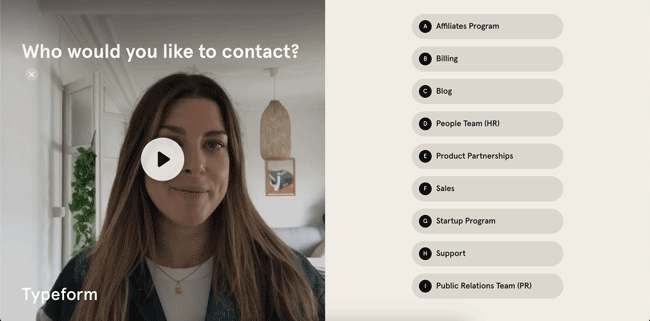
Let’s take a closer look at the components of this Typeform contact form.
Here are the form fields used in the example:
- Name
- Email address
- Message
- Phone number
- Website
There’s also a multiple-choice question field that uses conditional logic.
Here’s a similar form we made in Fatstash. Pretty neat, don’t you think?

Just like in Typeform, you can personalize the design of your contact form in fatstash, add images and videos, include your logo, and change the fonts and colors to fit your branding.
Unlike Typeform, Fatstash never puts our branding on your content. If you use Typeform, you’ll have to pay at least $49/month to remove their branding.
2. Customer satisfaction survey
Customer satisfaction surveys are an essential tool for any business. They help you understand what your customers like about your products or services, and what you can improve on.
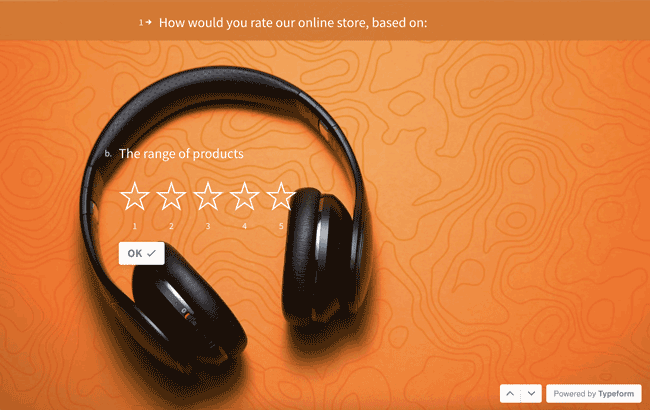
We like this Typeform survey example because it makes it painless for customers to offer input. The star-rating questions make it quick for users to answer and don’t require too much brain power either, meaning you’re more likely to get responses.
Want to make a similar customer satisfaction survey? Just add fields for basic customer information, such as name, email, and phone number. Then, create Likert scale questions or use star ratings to ask customers about their experience with your product or service.
At the end, be sure to include an open-ended question so customers can provide additional feedback.
Here’s what our version looks like in Fatstash.

We kept the design simple, but you can always add images, change up the colors, or customize the fonts to make it more eye-catching.
🔎 Looking for the gold standard for feedback forms? This Net Promoter Score (NPS) survey template is exactly what you need.
3. Product recommendation quiz
Product recommendation quizzes are a great way to engage with your audience and help them find the products that best meet their needs.
To make a product recommendation quiz, start by identifying the key features and benefits of your products. Then, create questions that ask the user about their needs and preferences and use conditional logic to show different questions and results based on their answers.
For example, if you sell skincare products, your quiz might include questions about the user's skin type, concerns, and preferences for natural or fragrance-free products. Based on their answers, the quiz would recommend specific products that best meet their needs.

👉 Here's the product recommendation quiz template we used for this example.
4. Feedback survey
Whether you’re an event planner or want to know what visitors think of your website, feedback surveys can provide valuable customer insights.
This colorful Typeform template combines a lot of different types of questions to help mix it up for the user while also making it quick and easy to give you the important information you need.

So, how can you create a similar survey without using Typeform? Well, along with name fields (should you choose) and star rating questions, try to include some image questions as well to find out how customers heard about you or what their needs are.
🎫 Try this event feedback form template and see what you think.
5. Registration or intake form
Save yourself tons of time and paperwork by going paperless with online registration, onboarding, and intake forms!
Whether you run a sports league or want to bring in new vendors for your business, a conversational registration form following this Typeform example makes staying organized easy. And it offers a much better user experience than big, long Google Forms.

To replicate this Typeform survey template, you’ll start by creating a conversational form with basic fields for the user’s name, contact information, and message.
Depending on your use case, you can then insert fields to collect data such as company name, website, a drop-down menu to select a specific age group or course, a datepicker for availability, and more.
See all of our registration and signup form templates that are ready and waiting for you! And again, even if the demo isn’t in the question-by-question format, it just takes one click to create a Typeform-style questionnaire from any form.
Should you use Fatstash instead of Typeform?
If your site runs on WordPress, there are a lot of reasons why Fatstash is better than Typeform.
Some of the biggest benefits of Fatstash include:
- Unlimited forms & entries - create as many conversational forms as you like and collect as many responses as possible. We’d never limit your success!
- More kinds of content - not only can you create conversational forms with fatstash, but you can also create all sorts of surveys, polls, quizzes, and calculators.
- Cost - Save up to $800 per year by switching from Typeform’s Business Plan to fatstash’s.
- Convenience - create and edit forms from inside WordPress, right in the backend of your website and schedule them too. You can’t do either with Typeform!
- Real-time data reporting - unlike Typeform results, display and view form entries as graphs and charts in real time.
How to make Typeform surveys in WordPress
Alright, let’s show you how easy it is to make a Typeform-style survey with Fatstash!
Once you install and activate the Fatstash plugin and its Conversational Forms add-on, you’re just three steps away from having awesome conversational forms on your WordPress website!
Step 1: Create a form
To create a new form, go to fatstash → Forms and then click the blue + Add New button in the top right of your screen.
Next, you can choose to use one of our pre-built form templates or build your own form from the ground up.
You can then add, edit, and remove form fields in our drag-and-drop form builder.

Don’t forget to hit Update to save your changes!
Step 2: Turn on conversational form mode
Time to make magic. 🪄 It only takes two clicks to convert any boring old form into a conversational form.
Head into your form’s Settings tab and then turn on conversational form mode. And that’s it!
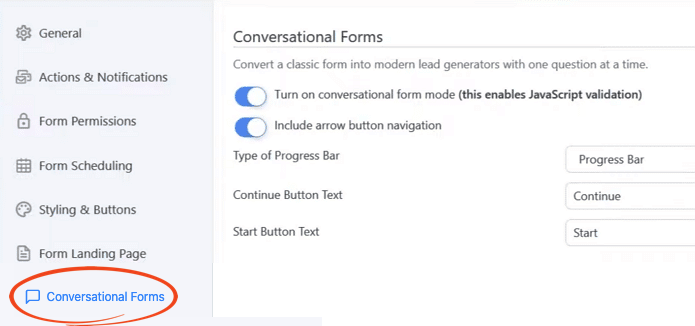
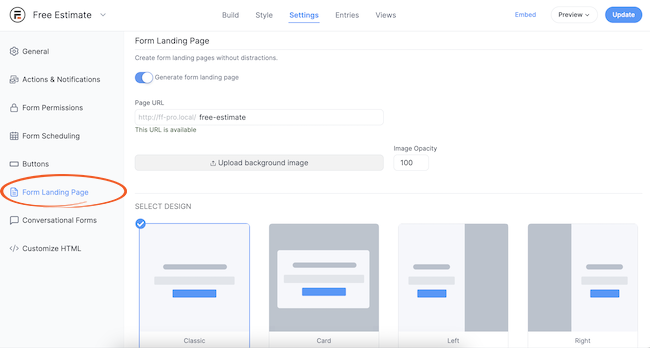
Want to add a survey landing page just like in Typeform? No problem! While you’re in the form Settings tab, click Form Landing Page.
Toggle the button to automatically generate your form landing page, then customize the landing page design below. Voilà!
Step 3: Publish your form
All that’s left is to share your form with the world! 🌎
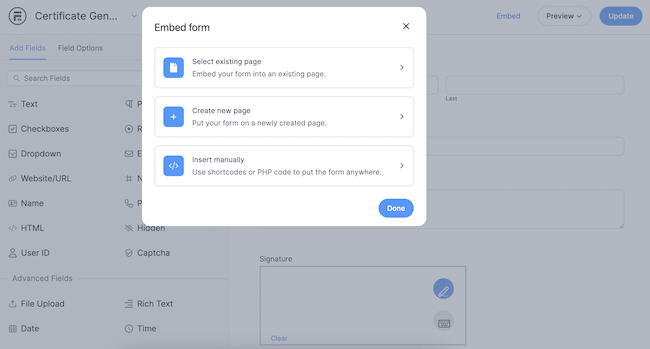
Click Embed at the top of your screen, then choose whether to add the form to an existing page, create a new page for your form, or get a shortcode to copy and paste the form wherever you want on your WordPress site.
Ready to replicate these top Typeform examples in WordPress?
As you can see, it’s easy to create great forms without Typeform. And you can even get more flexibility from your form builder — and save money too!
There are quite a few Typeform alternatives out there, with Jotform and Fluent Forms being among the best if you aren’t on WordPress. But if you really want to get the most out of your online forms, WordPress + Fatstash can’t be beat.
Read more from the fatstash blog
 12 Best Google Forms Alternatives [Compared]
 Typeform Signature Fields Don't Exist... Here's What To Do
 Outgrow vs Typeform, How To Choose
Did you know Fatstash is the most versatile WordPress form builder plugin available? If you're not already using it, try it out with our free plan or the full-featured pro version!
This article may contain affiliate links. Once in a while, we earn commissions from those links. But we only recommend products we like, with or without commissions.