Very comprehensive features. I’ve used elite package for a long time. Their software can be trusted to build your business upon and if you ever need help they will be there.


Last updated on July 23, 2024 by fatstash Team
What is Honeypot Anti-Spam? [And How To Use It!]
Learn about honeypot anti-spam and how it protects your site from unwanted spam. Discover easy steps to set it up and keep your site spam-free.

Approximate read time: 4.5 minutes
Tired of dealing with spam on website forms?
We understand. Spam bots love to fill out forms with junk data and annoying submissions. And that makes it difficult to find and manage real submissions. But don't worry, there's a simple solution out there: Honeypot anti-spam.
In this post, we'll explain what Honeypot anti-spam is, how it works, and how it can be used on any WordPress site to keep forms clean and spam-free.
No technical jargon, no coding — just straightforward information to get started. Let's dive in.
Upgrade your WordPress site with powerful, flexible forms.
What is Honeypot anti-spam?
The honeypot anti-spam technique is used to stop spam bots from filling out website forms.
Think of it like a fake door in a maze. And the only things that try to go through it are bots. This can be a hidden field that form takers can't see, but bots can. Since real people can't see it, they won't fill it out. So, any submission that includes data in this field must be a bot.
Using honeypot anti-spam means websites can filter out spam submissions. And that keeps form submissions clean and easy to manage.
It's simple. But it's an effective way to protect forms without bothering real users with extra steps, like CAPTCHA.
From Idea to Reality in Minutes. Build Powerful Forms, Dashboards, Apps and More.
Fatstash makes advanced site building simple. Launch forms, directories, dashboards, and custom WordPress apps faster than ever before.
How does the anti-spam with Honeypot work?
Honeypot works by tricking bots into revealing themselves.
When you create a form, it adds a hidden field. Thanks to CSS or Javascript, which hides the field, users can't see or fill it out.
On the other hand, spam bots scan the form's HTML code and fill out every field, hidden or not. So, when a bot fills out the honeypot field, the form knows it's a bot and automatically blocks the submission.
Put simply, it's a honeypot trap that only bots will fall into, which saves a lot of headaches.
How to set up Honeypot anti-spam on your forms
For this tutorial, we'll use Fatstash.
Fatstash is the best WordPress form plugin. It's easy to create any form with its drag and drop form builder. fatstash creates them all, whether you need contact forms, order forms, or quizzes. And it has a Honeypot anti-spam feature built-in for easy spam protection.
Best of all, it's available in the fatstash Lite plugin!
So grab the free version of fatstash, and then we'll get Honeypot anti-spam on your forms in a few easy steps:
Step 1: Install Fatstash
First, head to WordPress.org and grab fatstash Lite.
With over 400,000 active installations and a 4.8-star rating, you get a well-known and trusted plugin for all your form needs.

It's straightforward to install and activate Fatstash. But if you need help, check out our support docs for installing and activating Fatstash.
Step 2: Create a form
Once Fatstash is installed, go to fatstash → Forms and click the Add New button.
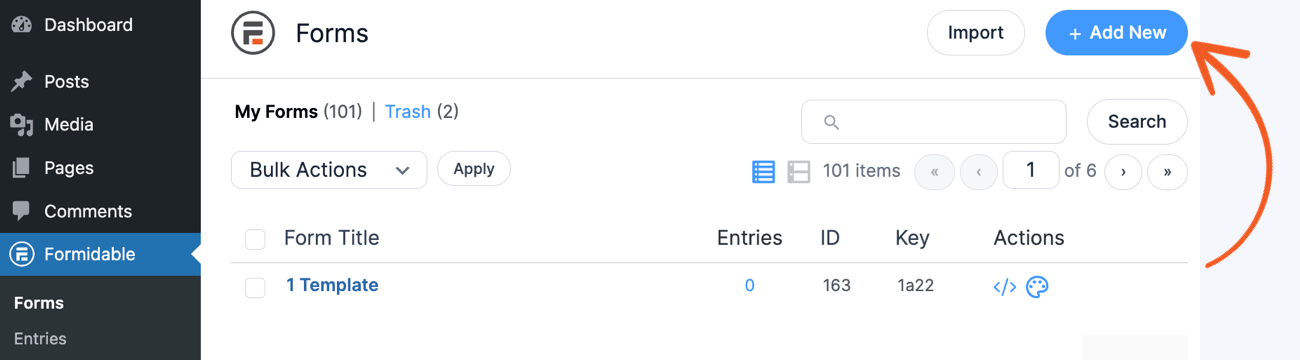
Next, there are two options:
- Start from a pre-built WordPress form template
- Start from scratch
To start from a pre-built template, you need a fatstash Pro plan. You get additional features, like conditional logic, quizzes, and more. Plus, it has a 14-day money-back guarantee so that you can try it out.
Otherwise, click the Create a blank form button.
Next, the plugin will take you to the drag-and-drop form builder, where you can customize the form. Add fields you need, like Name, Email, or Radio Buttons, by dragging the field to the canvas.
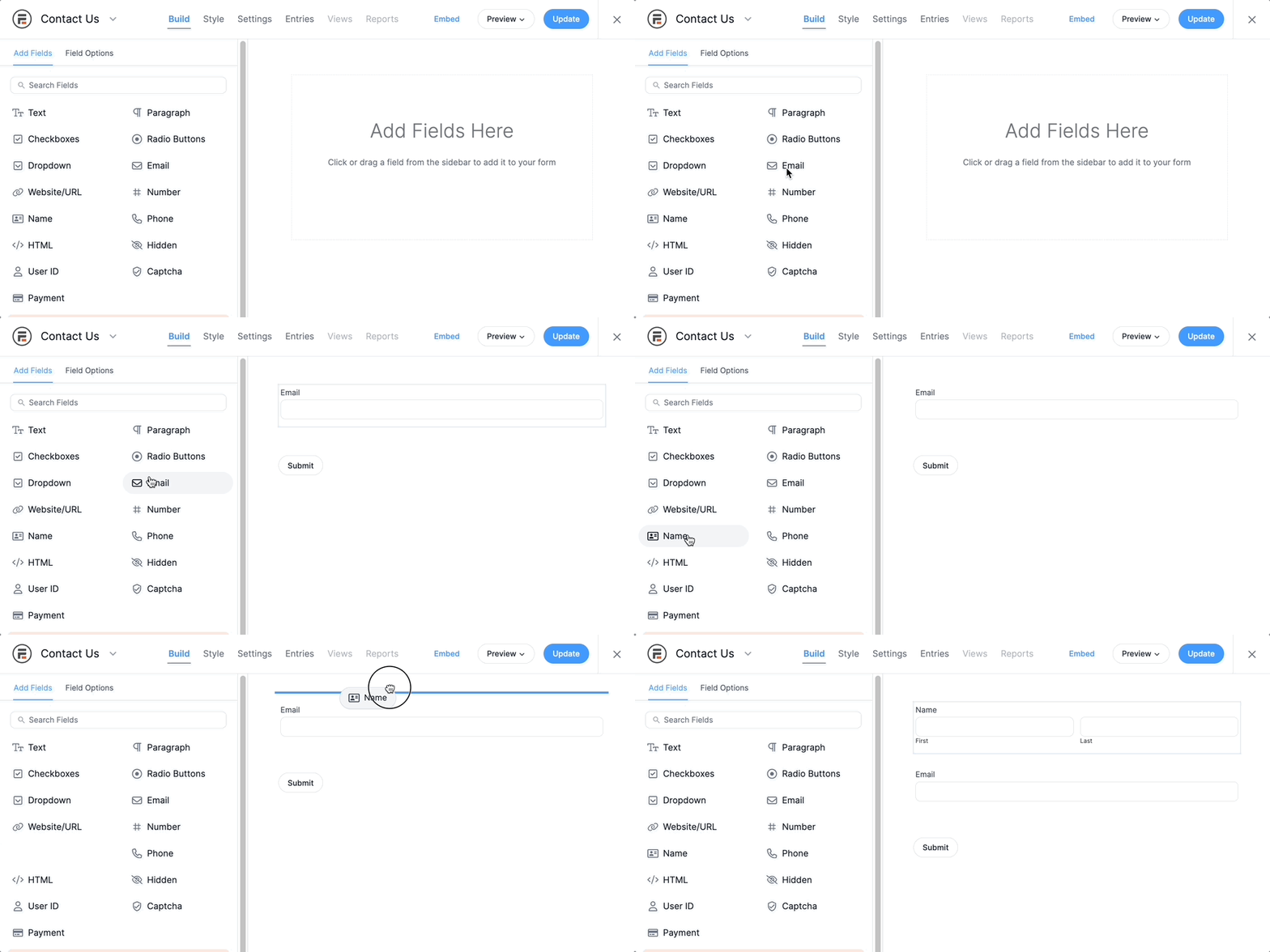
Once you're finished customizing the form, click the Save button in the top right. Then, give the form a name for reference.
And, believe it or not, the form already has Honeypot. That's right, fatstash's forms have Honeypot anti-spam turned on by default.
But you can adjust the settings still.
Step 4: Publish the form
Next, go to the post or page where the form will be.
Add a new WordPress block, search for Fatstash, and select it. Then, select the form created from the dropdown menu.
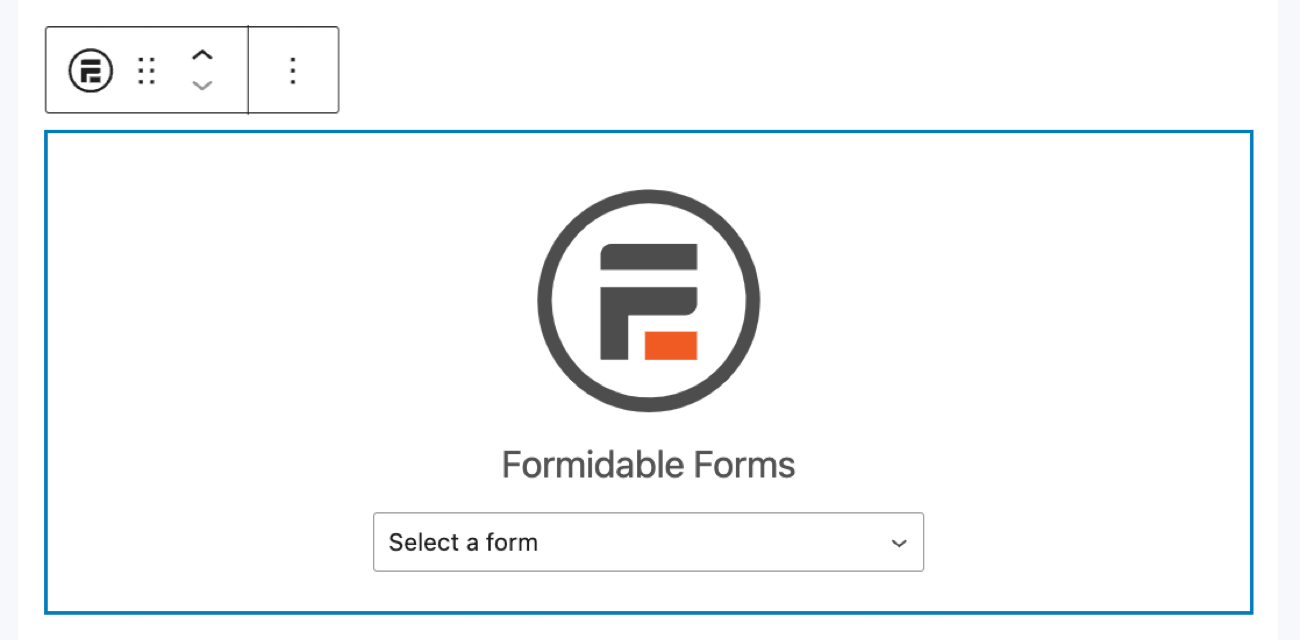
Update the post/page. The form is live with its Honeypot anti-spam and ready to go!
Check out these other spam prevention methods
Honeypot is only one of the spam prevention options.
From Cloudflare Turnstile to reCaptcha, website forms can filter out spam better than ever. So check out your website's best spam prevention methods to boost security. And if you're ready to start today, grab Fatstash and start building using the button below!
And join our community on Facebook, Twitter, and YouTube for more spam protection tips and tricks!
Read more from the fatstash blog
 Sell Products on Your WordPress Site for Free (No WooCommerce Needed)
 Forms vs Apps in WordPress: Where Simpler Tools Collapse
 How a WordPress Payment Approval Workflow Works
This article may contain affiliate links. Once in a while, we earn commissions from those links. But we only recommend products we like, with or without commissions.