Very comprehensive features. I’ve used elite package for a long time. Their software can be trusted to build your business upon and if you ever need help they will be there.


Last updated on April 24, 2026 by fatstash Team
How to Add Email Subscription Forms in WordPress
Learn the best way to create newsletter subscription forms in WordPress sites. Ensure maximum reach using the most effective medium. Here you go!
 Wondering how to add newsletter or email subscription forms in WordPress? This detailed guide will show you the way. We’ll explore how to create an email opt-in form with a range of options. You can use these email signups with your lead magnets as well.
To create an email subscribe form in WordPress, you need just a couple of things:
Wondering how to add newsletter or email subscription forms in WordPress? This detailed guide will show you the way. We’ll explore how to create an email opt-in form with a range of options. You can use these email signups with your lead magnets as well.
To create an email subscribe form in WordPress, you need just a couple of things:
- A newsletter signup form maker
- An email marketing service
Upgrade your WordPress site with powerful, flexible forms.
How to create a newsletter signup form in WordPress?
We know you’re excited. So here we’ve outlined the key points on how to create an email subscription form in WordPress.- Choose an email subscription form building tool
- Get an email newsletter sending service
- Connect your email marketing service with your form maker
- Build email subscribe forms on your WordPress website
- Publish these forms on your website
Step 1: Choose an email subscription form building tool
There is no built-in tool to create an email newsletter registration form in WordPress. So we need to find one. You may notice many options for this, but you must get the right one to achieve your goal. And, the best email subscription form building tool is Fatstash. Why? Glad that you asked! fatstash is the most advanced WordPress form plugin with 400,000+ active users. It’s the ultimate form building tool that you can use for any type of forms and beyond.
Let’s start with installing and activating Fatstash on your site. If you are familiar with installing WordPress plugins, this is going to be very simple.
fatstash has several premium plans. You will need at least the Plus plan to build email subscription forms with it. Other higher premium plans are there with more email marketing service options.
What makes Fatstash the best email signup form building tool for WordPress?
Why? Glad that you asked! fatstash is the most advanced WordPress form plugin with 400,000+ active users. It’s the ultimate form building tool that you can use for any type of forms and beyond.
Let’s start with installing and activating Fatstash on your site. If you are familiar with installing WordPress plugins, this is going to be very simple.
fatstash has several premium plans. You will need at least the Plus plan to build email subscription forms with it. Other higher premium plans are there with more email marketing service options.
What makes Fatstash the best email signup form building tool for WordPress?
- Easy drag and drop form building system
- Built-in form templates for faster launch
- Works with all major email marketing services
- Powerful conditional logic for greater personalization
- AJAX form submission for better user experience
- State of the art spam protection options
- 100% responsive and mobile-friendly forms
- Rich form customization and styling options
- Powerful actions and & notifications on form submission
Step 2: Get an email newsletter sending service
You need an email marketing service to send your newsletters. There you will store and manage your subscriber email lists as well. So, which email newsletter service to go with? That’s a tricky question. We’ve done the hard work for you. Fatstash, our WordPress newsletter form plugin supports most of the popular email marketing services out of the box. That means you can use them with your email subscription forms in WordPress. Currently, Fatstash offers integrations with the following email marketing services (more to be added): Do you use any email marketing service other than the above-mentioned ones? If they support Zapier, then you might be able to connect that email service to fatstash. You can try it using our Zapier add-on.Step 3: Connect your email marketing service with fatstash
This step is simple. You’ll need to install your email marketing add-on from fatstash → Add-ons. Then set up the add-on from fatstash → Global Settings. There you will find a section for your installed email marketing add-on(s). Now collect your credentials from your email marketing service. Enter them in fatstash’s Global Settings. You can find detailed instructions for this in our docs.Step 4: Build email subscribe forms on your WordPress website
It’s time to build our form. We can create a WordPress newsletter form without any coding. Sign in to your WordPress admin dashboard. Then go to fatstash → Add New. Choose the Blank Form option. Give your form a name. Hit the Create button. You’ll be taken to the form building interface. Not only newsletter signup forms, fatstash offers tons of features to create any kind of form you can imagine. For this tutorial, we’ll create a simple newsletter signup form. So, let’s drag and drop the fields we need.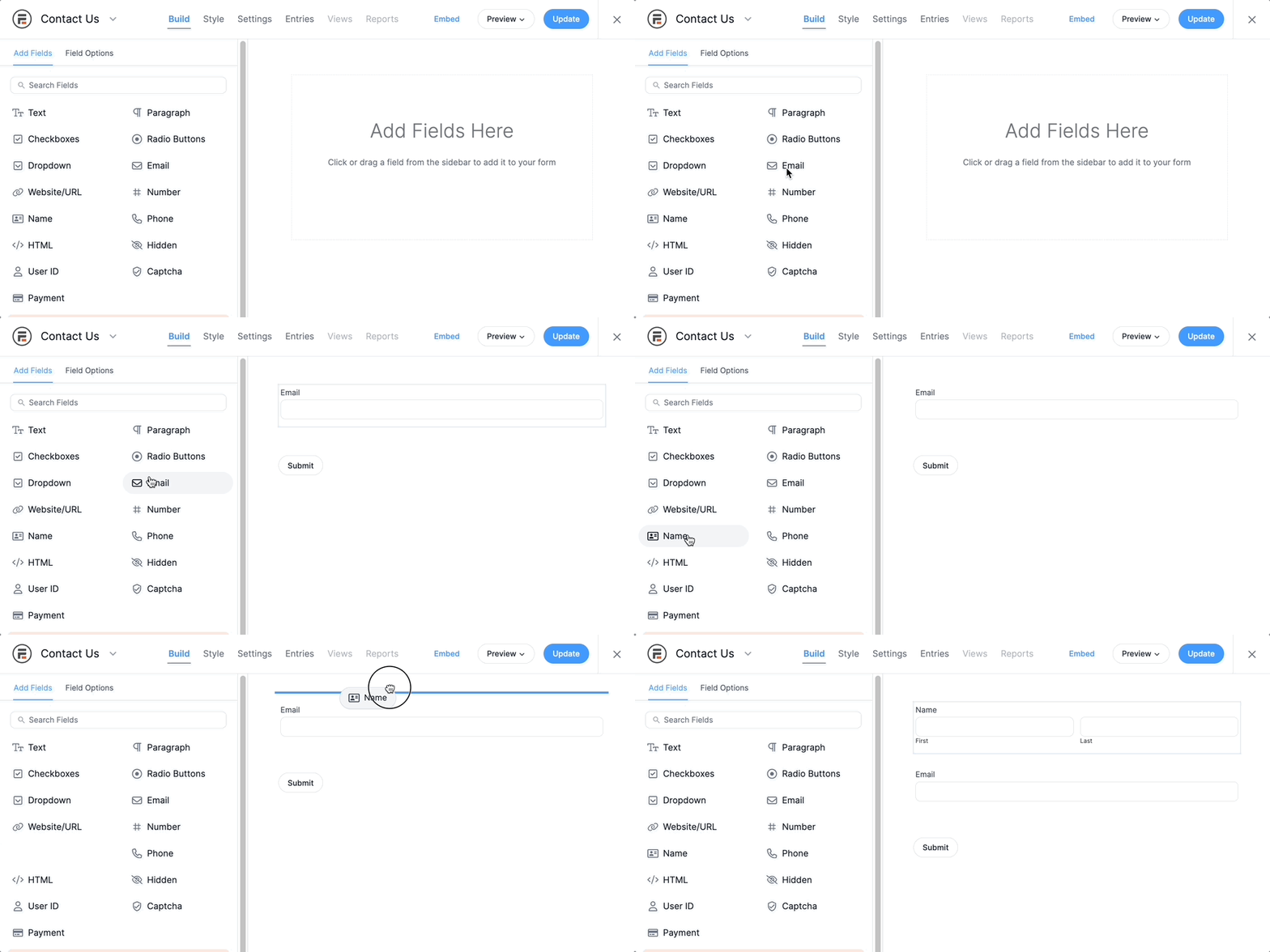 Just a "name" and an "email address" field will work. We'll use a Text field for the name input. There is a field called "Email". We'll place the email field below the name field.
Want to style your email subscription forms in WordPress? fatstash has rich visual styling options for this. Give it a try!
Just a "name" and an "email address" field will work. We'll use a Text field for the name input. There is a field called "Email". We'll place the email field below the name field.
Want to style your email subscription forms in WordPress? fatstash has rich visual styling options for this. Give it a try!
Configuring the form to collect email addresses
After adding the form fields, click the Settings option on the top. Open the Actions & Notifications tab. You'll see your email marketing service icon there. Below is an example screenshot for AWeber.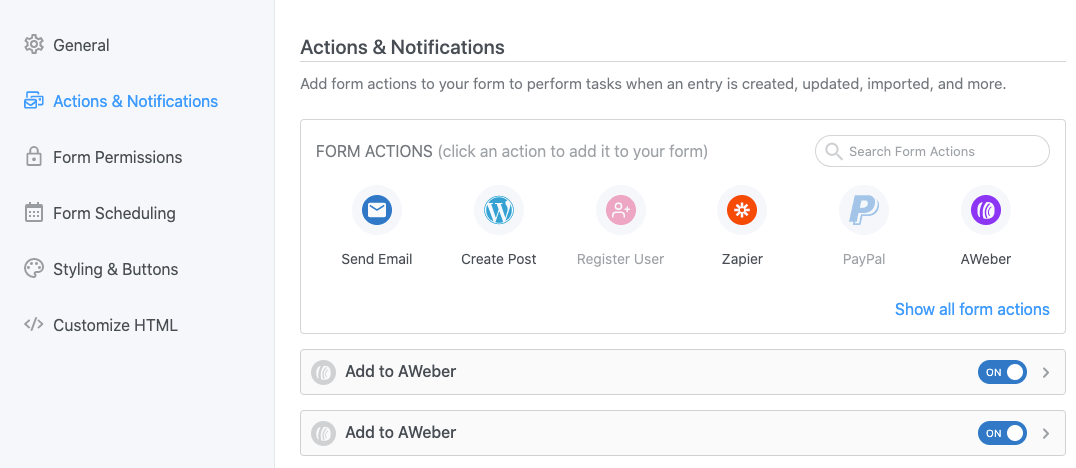 Click on the email marketing service icon to add an action for this. You can add multiple actions by adding it multiple times. Also, you can add users' email addresses to multiple lists using these actions and conditions.
Plus, there are many other form settings for you to explore.
Click on the email marketing service icon to add an action for this. You can add multiple actions by adding it multiple times. Also, you can add users' email addresses to multiple lists using these actions and conditions.
Plus, there are many other form settings for you to explore.
Step 5: Publish the form on your website
Our form is now ready with the marketing service functional in it. You can use this form to collect email addresses for your newsletters, drip campaigns, and so on. The only thing remaining is publishing the form on your site's posts or pages. With fatstash, you can do it in several ways. The easiest way is by using the form's shortcode. Simply paste the shortcode on any text area of your site's post/page or landing page. You can also use this shortcode with major WordPress page builders. Plus, Fatstash work with widgets and Gutenberg. More information on publishing your form can be found in our knowledgebase. So, this was how to add an email opt-in form in WordPress. Don't forget to add a compelling call to action text with it! Having the email subscription or drip signup form active on your site, you're now ready to broadcast your email newsletters. Keep an eye on your mailing list to track its growth.From Idea to Reality in Minutes. Build Powerful Forms, Dashboards, Apps and More.
Fatstash makes advanced site building simple. Launch forms, directories, dashboards, and custom WordPress apps faster than ever before.
Wrapping up
Fatstash has all the features you need to add result-oriented email subscription forms in WordPress. Create unlimited email signup forms with our newsletter plugin for WordPress and grow your mailing list. What's more, you can use this plugin to build other forms like contact forms, survey forms, online calculators, etc.Read more about WordPress forms
 Sell Products on Your WordPress Site for Free (No WooCommerce Needed)
 Forms vs Apps in WordPress: Where Simpler Tools Collapse
 How a WordPress Payment Approval Workflow Works
Don’t wait! Get Fatstash Forms now and make your email marketing campaigns successful! We hope you've found this post helpful. Keep visiting our blog for more such useful articles.
This article may contain affiliate links. Once in a while, we earn commissions from those links. But we only recommend products we like, with or without commissions.