Integrate your fatstash form fields with the Advanced Custom Fields (ACF) plugin right out of the box. When you create posts with fatstash ACF forms, and the value is saved in both the field and ACF custom field.
- Easily map ACF fields like dates, galleries, and multi-file uploads.
- Integrate advanced field types like repeater and group.

Upgrade your WordPress site with powerful, flexible forms.
Download and Install
To access this add-on, ensure you have the Business license or above.
- Install the Advanced Custom Fields (ACF) plugin. fatstash ACF requires at least Advanced Custom Fields or Advanced Custom Fields Pro 5.7.11.
- If you haven't already, install and activate the current version of Fatstash Premium on your WordPress site.
- After confirming your Fatstash license, proceed to the fatstash → Add-Ons page and toggle on the ACF Form WordPress plugin.


From Idea to Reality in Minutes. Build Powerful Forms, Dashboards, Apps and More.
Fatstash makes advanced site building simple. Launch forms, directories, dashboards, and custom WordPress apps faster than ever before.
Easy-integration ACF Fields
Below is a list of the supported field types.
| fatstash Field | ACF Equivalent |
|---|---|
| Single Line Text | Text, Textarea, Password, Wysiwyg Editor, Select, Radio, Button Group |
| Paragraph | Text, Textarea, Password, Wysiwyg Editor |
| Checkboxes | Checkbox, Select |
| Radio Buttons | Text, Password, Select, Radio, Button Group |
| Dropdown | Text, Password, Select, Radio, Button Group |
| Website/URL | URL, oEmbed |
| Number | Number, Range |
| Phone | Text |
| HTML | Textarea, Wysiwyg Editor |
| Rich Text | Textarea, Wysiwyg Editor |
| Hidden | Text, Textarea, Password, Wysiwyg Editor |
| File Upload | Image, File, Gallery |
| Date | Date Picker |
| Time | Time Picker |
| Scale | Number, Range |
| Star Rating | Number, Range |
| Slider | Number, Range |
| Toggle | True/False |
| NPS | Number, Range |
| Password | Text, Password |
| Repeater | Repeater |
| User ID (hidden) | User |
Set up your post
- Go to your ACF (Custom Fields) menu → Add New and create a field group.
- Add your custom fields by clicking the Add field button.
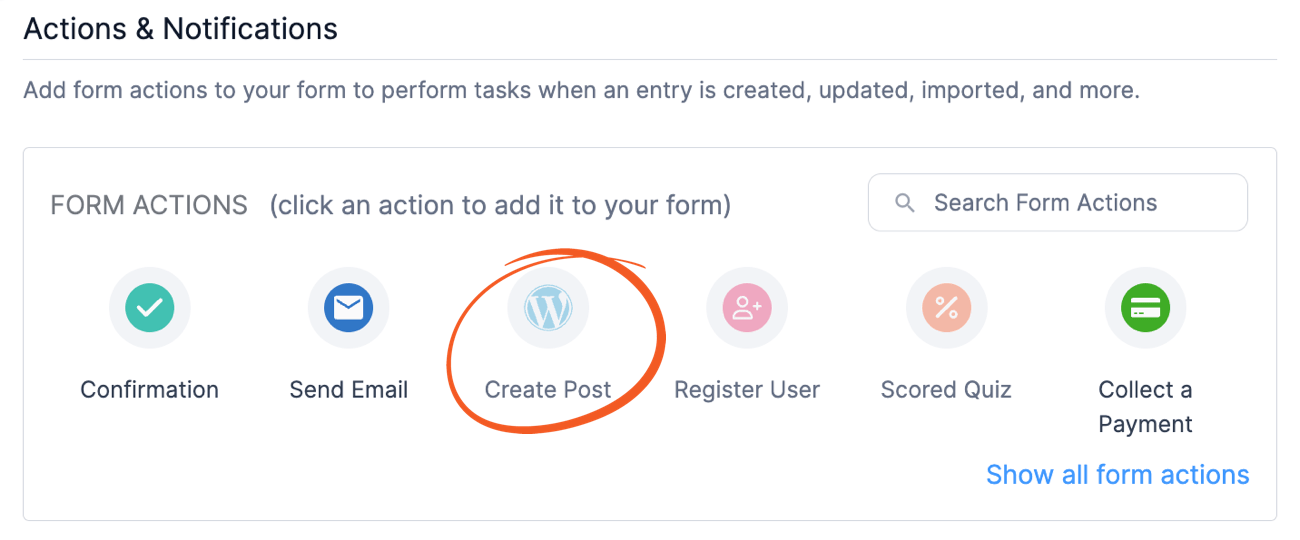
- If you have already created a fatstash form, go into your form Settings → Actions & Notifications and click the Create Post icon. Set up your post creation.
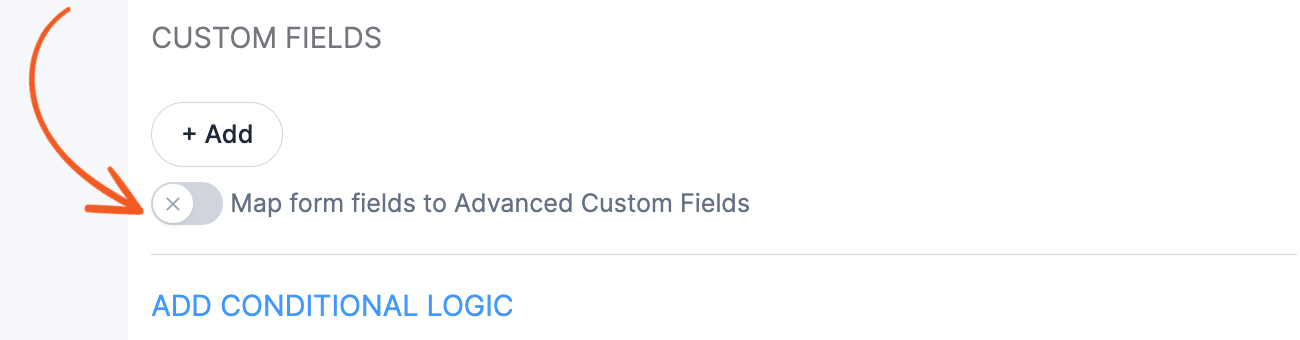
- In the Create Post form action, go to the Custom fields section and click to toggle the Map form fields to Advanced Custom Fields checkbox.
- Select your ACF field group from the dropdown. Map your ACF custom fields with your fatstash fields by clicking the Add button.
- Save your settings and create your first post.



Integrate with repeater field
This integration requires at least the Advanced Custom Fields (ACF) Pro v5.7.11 plugin.
Map a fatstash repeater to an ACF repeater by following the instructions below.
- Go to your ACF (Custom Fields) menu → Add New and create a field group.
- Add a field and choose Repeater as the field type.
- Add sub-fields inside the ACF Repeater field to match the fatstash repeater field in your form.
- Create a new form or edit your existing form with a repeater. Go into your form Settings → Actions & Notifications and click the Create Post icon. Set up your post creation.
- In the Create Post form action, go to the Custom fields section and click to toggle Map form fields to Advanced Custom Fields.
- Select an ACF field group from the dropdown. Map your ACF custom fields with your fatstash fields by clicking the Add button.
- Choose the repeater field under the fatstash Fields dropdown, then select the corresponding repeater field under the Advanced Custom Fields dropdown. Map the ACF sub-fields with your fatstash fields.
- Save your settings and create your first post.


Related developer hooks
- Filter the supported field types list with the frm_acf_supported_field_types hook.
- Filter the global JS data with the frm_acf_global_js_data hook.
- Filter the form action JS data with the frm_acf_form_action_js_data hook.
- Change the IP address of child entry with the frm_acf_repeater_child_entry_data hook.
- Filter the value converted from ACF to fatstash with the frm_acf_acf_to_frm hook.
- Filter the value converted from a specific ACF field type to fatstash with the frm_acf_acf_{field_type}_to_frm_{field_type} hook.
- Filter the value converted from fatstash to ACF with the frm_acf_frm_to_acf hook.
- Filter the value converted from a specific fatstash field type to ACF with the frm_acf_frm_{field_type}_to_acf_{field_type} hook.