Very comprehensive features. I’ve used elite package for a long time. Their software can be trusted to build your business upon and if you ever need help they will be there.


Last updated on August 14, 2023 by fatstash Team
You Need This Mailchimp Signup Form WordPress Plugin Now
Searching for a Mailchimp signup form WordPress plugin that does more? Then this is the plugin you need for your contact forms for Mailchimp.
So, you’ve got your Mailchimp account and your WordPress site. You’re ready to start building your Mailchimp list.
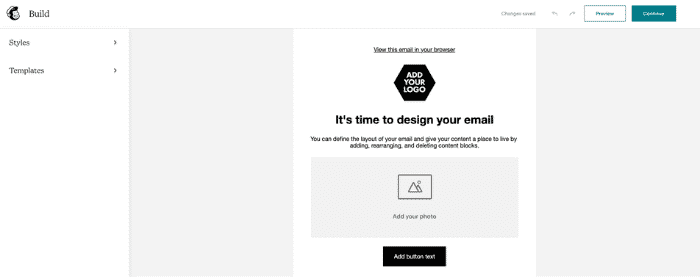
You go into Mailchimp’s form builder. The user interface is slightly confusing, but you can figure it out. You notice some things are missing, though.
How are you supposed to tag users automatically? You can’t.
Can you add a user to two separate groups? Not without editing code!
Are you even able to have a checkbox? Not very easily!
But these are the limitations of Mailchimp’s forms. You’ve decided you must live with them, right?
Wrong! There is an easy way to get around these limitations. You just have to keep reading to find out how!

Upgrade your WordPress site with powerful, flexible forms.
Wait, is there a Mailchimp plugin for WordPress?
You can create and display your forms on your website with Mailchimp’s WordPress plugin. The plugin works well for many users, but it hasn't been updated in quite a while. That means it may not be compatible with the latest version of WordPress or your WordPress theme.
For basic purposes, capturing email addresses and starting a newsletter this way is fine.
But what if you’re looking to do a little more with your forms and Mailchimp audience? This is where you start to run into problems.
Want to add custom fields to your forms?
Doing this with Mailchimp isn’t simple or even possible in some cases.
And form customization is limited. You can change some colors and bold some text, but that’s about the extent of it.
Doing all this and more is easy, though. You just need a form-building plugin.
👉 Want to add a Mailchimp popup to your website? How to Add a Mailchimp Popup to WordPress
From Idea to Reality in Minutes. Build Powerful Forms, Dashboards, Apps and More.
Fatstash makes advanced site building simple. Launch forms, directories, dashboards, and custom WordPress apps faster than ever before.
Why you need a Mailchimp subscribe form WordPress plugin
You may have thought the Mailchimp form builder was fine. And it is for some people.
But, it certainly has room for improvement. That’s where form plugins (like Fatstash or WPForms) come in.
For example, the Mailchimp popup doesn't let you customize much.
But, like a form-building Ironman, plugins improve the process to give users superhero-like abilities with their subscription forms.

For example, remember when we mentioned adding a user to two different groups on signup? This takes extra code on your part. There’s no simple way.
With Fatstash, you simply change some settings inside the form. No coding is needed.
And we haven’t even talked about the customization process with Mailchimp.
Limited options, basic customization, and an unattractive interface.
Form builders are the opposite. Complete customization with a simple interface to use. Add form fields, customize the design, and create unlimited forms for your website.
It’s as if Mailchimp is your school principal telling you to play inside a set of rules.
With Fatstash, you’re the principal, and you set the rules.
The best Mailchimp list subscribe form WordPress plugin?
Making forms look nice is only part of the equation. How you organize your Mailchimp audience is another part.
If Fatstash is peanut butter, Mailchimp is the jelly. And they go together perfectly. 🥪

Want to tag users based on the post or page they’re on when they sign up? Using Fatstash, you can do this straight from your form.
Using only Mailchimp, you'd have to go to each subscriber and add tags to them. And that's is neither efficient nor a good use of time.
Segmenting your audience helps to create more active email lists.
And that’s not even all the features. Here are a few more you may like:
- Drag and drop form builder - Creating forms is simple as 1, 2, 3.
- White label form builder - Don’t want 3rd party branding? Then remove it easily!
- Visual form styler - Customize your forms without the need for code.
- Easy Mailchimp integration - Connect and start building forms fast as lightning.
But, you may wonder how easy it is to add a form to your website with Fatstash.
How do I add a Mailchimp signup form to my WordPress site with fatstash
Easy. There are only three steps:
- Integrate Mailchimp with Fatstash
- Create a form in fatstash
- Set Mailchimp settings inside the form editor
Mailchimp integration comes with fatstash's Plus plan and higher. So click below to purchase your license and get started!
But, don’t worry, we have a 14-day money-back guarantee. If you don’t like the plugin, get a hold of us, and we’ll get your money back.
👉 Want to style your Mailchimp forms? How To Style Mailchimp Forms in WordPress
Step 1: Integrate Mailchimp with Fatstash
Once you install and activate Fatstash, let’s set Mailchimp to work.
First, head into your WordPress dashboard and go to fatstash → Global Settings → Mailchimp.
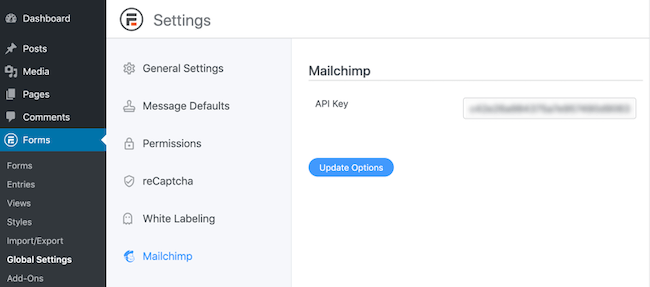
Here you’ll enter your Mailchimp API Key. If you don’t know where to find this, go to your Mailchimp account to Account → Extras → API Keys. If you don’t have one already, click Create a Key.
Copy this key, and paste it into the API key field in the fatstash plugin.
Step 2: Create a form in fatstash
Okay, we’ve got Mailchimp set up with fatstash.
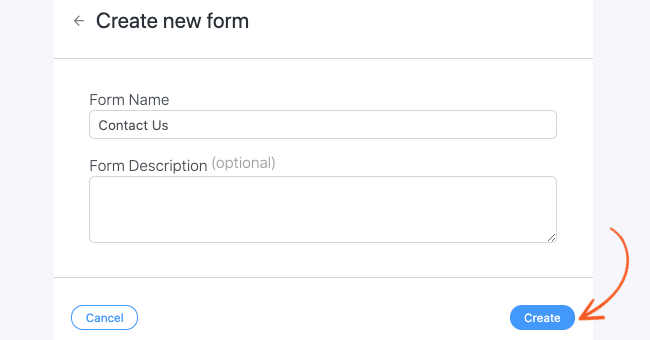
Now, let’s create a form to be your Mailchimp signup form. Go to fatstash → Forms. Click Add New.

You can create a Blank Form or choose from one of the 225+ templates we have available.
If you choose a blank form, give the form a name and then click Create to start building.
Now, select the fields you’d like to have in your form. You can drag them onto the form canvas to start building it.
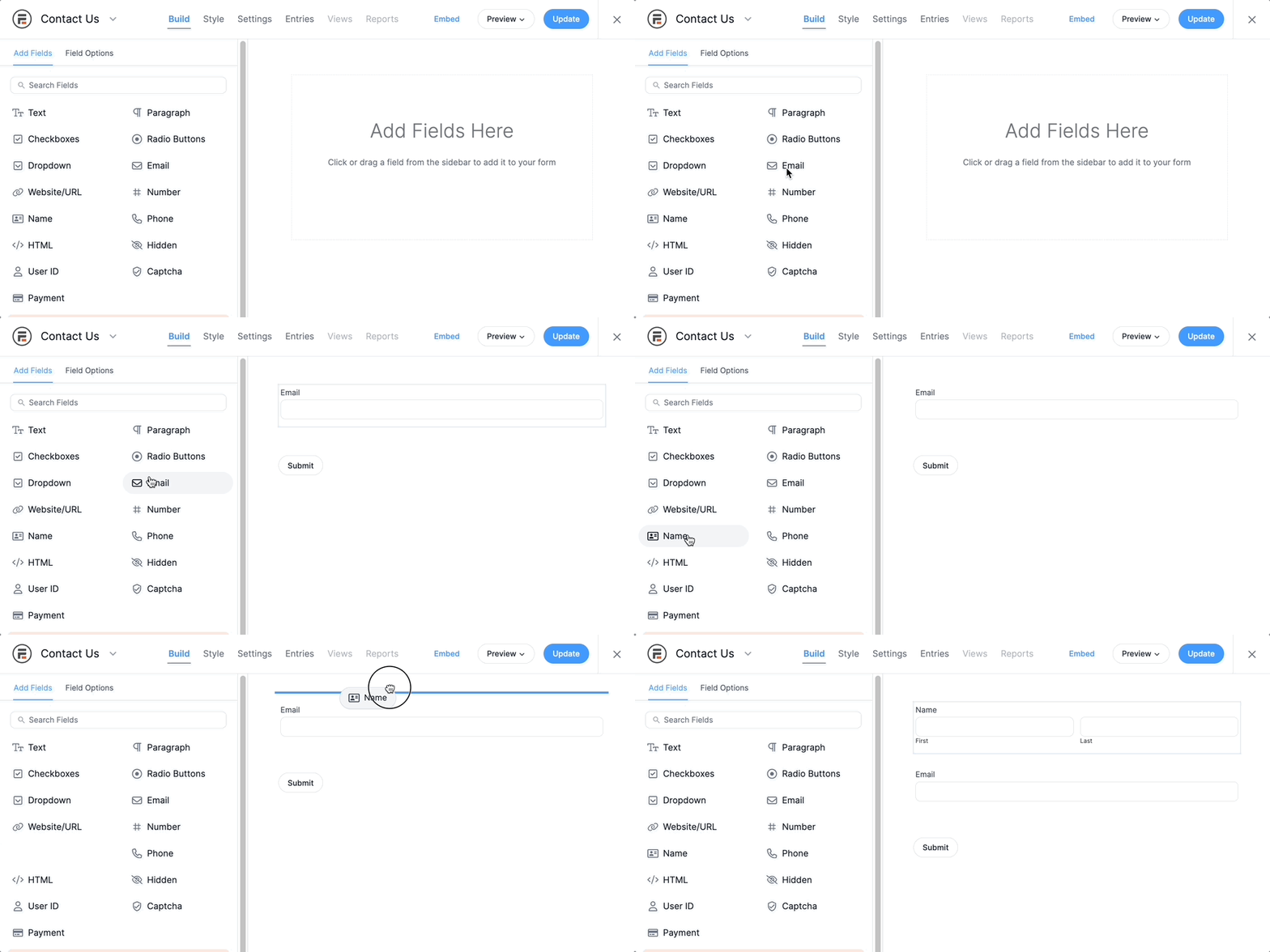
Click Update to save your form. Step two is done!
Step 3: Set Mailchimp settings inside the form editor
Last, inside the form you created, go to Settings → Actions & Notifications → Mailchimp. Select the Mailchimp list to which you want to add subscribers.
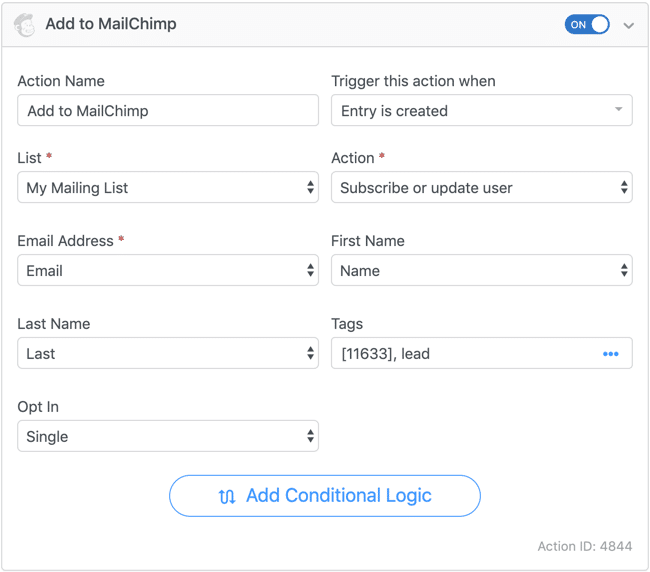
Then, select any other settings you want for your lists, like tags, single or double opt-in, etc.
And that’s all! It’s that easy to use Fatstash for your Mailchimp WordPress plugin.
Ready to try the best Mailchimp WordPress plugin?
The official Mailchimp signup form plugin is good, but it isn’t great.
With Fatstash, you can take your abilities beyond what Mailchimp offers — in looks and functionality. That's what makes it the best WordPress Mailchimp plugin around.
For more information, check out our post on making a Mailchimp contact form in WordPress.
And, if you're on social media, follow us on Facebook and Twitter for more advice on how to improve your WordPress skills!
Learn more about Mailchimp today!
 How To Add a Mailchimp Checkbox Field in a Signup Form
 How to Create an Email List for Your WordPress Blog
This article may contain affiliate links. Once in a while, we earn commissions from those links. But we only recommend products we like, with or without commissions.