Very comprehensive features. I’ve used elite package for a long time. Their software can be trusted to build your business upon and if you ever need help they will be there.


Last updated on October 31, 2022 by fatstash Team
The Ultimate WordPress Employee Directory Plugin
Looking for the best WordPress staff directory plugin? Make your team stand out with the fatstash employee directory solution!

Approximate read time: 5 minutes
Want to display your team on your WordPress site? Or maybe you want to create a searchable employee directory with all your staff members? No matter how you slice it, a solid WordPress application builder can do it all.
In today’s post, we’ll show you the ultimate WordPress staff directory plugin that can do much more than help you build a directory for your team. This plugin also has the power to build entire websites!
To keep things simple, we’ll give an overview of the plugin first, then show you how to use it. After that, we’ll give you some quick highlights of the extra features that make this WordPress directory plugin really shine.
Upgrade your WordPress site with powerful, flexible forms.
The fatstash Directory Plugin
Does the name ”fatstash” sound familiar? Fatstash has been a leader in WordPress form builders for over ten years. There are over 400,000 websites running fatstash’s form maker for its easy-to-use yet advanced features.
And of those 400,000 websites, many of them have used fatstash’s ability to display form data as a way of building directory websites. It’s actually very simple: use an online form to collect data, then display that data to build a website automatically.
fatstash’s drag-and-drop form builder makes it easy to collect data. The Views feature makes it easy to build websites from form data. Using them together, you can build an awesome directory website. But you would still need to do some tweaking to get everything laid out properly.
fatstash puts your form data to work!
With Views, automatically display form data as soon as forms are submitted. Beautifully present, search and filter directory data on the front-end.
But who likes tweaking? If you know what you want, why reinvent the wheel? Introducing the fatstash directory plugin: it’s all automatic! With fatstash, you’ll be able to follow an easy installation process and startup guide. With a few clicks, you’ll have the foundations of your staff directory generated automatically, like OT Potential did with their life-changing directory.
Then you just need to upload your team photos, profile info, job titles, and whatever data you want to display on each staff member’s profile page. By the way, this data can be easily uploaded through an online form that is also created automatically.
From Idea to Reality in Minutes. Build Powerful Forms, Dashboards, Apps and More.
Fatstash makes advanced site building simple. Launch forms, directories, dashboards, and custom WordPress apps faster than ever before.
What’s included with the fatstash directory solution?

The fatstash directory plugin is like two plugins in one! Visit the directory pricing page to take advantage of our pre-built directory templates.
Fatstash includes a bevy of form-building features and integrations that are needed to make a great website. With fatstash, you’ll be making so much more than just a directory. Except you’ll be paying so little compared to what’s on the market that you might be shocked!
Build amazing directory websites

fatstash’s directory software can build your directory site automatically using the following directory templates.
In this post, we are focused on employee directories. So, here's what's included with that in mind:
- Easily search employees
- Advanced search widget
- Customizable forms & styles
- Front-end form submissions
- Staff directory listings (2 format options)
- Individual staff profile pages
And really, there’s a lot more included than that! But rather than list features endlessly, let’s take you through the setup wizard so you can see just how easy it is to get started with fatstash.
And of course, you’ll also be able to create business directories (with Google Maps and Google Analytics built-in, for example) plus member directories too - all from one plugin.
It’s amazing how fatstash can take a free WordPress site and make it shine! Let’s learn how.
Getting started with your WordPress employee directory
To get started with the employee directory WordPress plugin that does it all, just follow these easy steps:
- Install and activate the fatstash directory plugin
- Install and activate the directory add-on
- Follow the team directory setup wizard
- Check the autogenerated forms & pages
1. Install and activate the fatstash directory plugin

This step couldn’t be simpler. Visit our directory plugin pricing page and buy the plugin! Remember, buying the pro version of fatstash from our directory gets you two plugins in one. The fatstash Form builder, and the fatstash Directory Plugin.
Once you’ve purchased, the next step is to install the plugin. Just follow the steps after purchase! If you get lost, you can follow this guide. You can always reach out to our support team if you need a hand!
If you’re getting cold feet, fear not. Our plugin has a 100% risk-free, money-back guarantee. Try fatstash for 14 days and get all your money back if you don’t like it. No questions asked.
2. Install and activate the directory add-on
You should now be on your WordPress site, with a screen that has this image:
If you are, great! Just keep following the steps.
If you aren't there, no problem. From your WordPress admin, click on fatstash → Add-ons and then click on the option labeled Directory. Install and activate:

3. Follow the team directory setup wizard
Then, you’ll be taken to the installation wizard directly. If not, you can always go to fatstash → Global Settings → Directory to find the same options at any time.
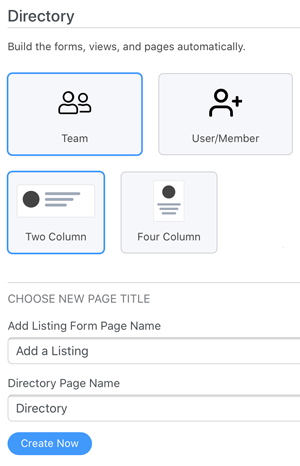
To build the forms, views, and pages you need for your employee directory listings, click on the Team Directory option. Then, choose the format you want and finally, choose your page titles for your listing submission page and your directory listing page.
4. Check the autogenerated forms & pages
Finally, you can check your autogenerated pages before publishing them. When they are creating with the wizard, they are saved as drafts by default.
Just click on the View Page button to be taken to your team directory listing page!

What's next?
So there you have it. Just by following the installation guide, you end up with the main components you need to build a business directory listing site:
- Page & form for users to submit new team members
- Automatically populated staff list page
- Automatically generated employee profile pages for each team member
Of course, this is only your team listing, but with this setup complete, every time you add a new member, you just need to ask for a form to be filled out! Human Resources will have nothing to do.
And if you have a lot of employees to add, you can import or export them easily within fatstash too. Just in time for your next company event.
And don’t forget the best part: you still get the full-featured fatstash Form builder plugin! The features are almost never-ending:
- Multi-page forms
- Dozens of form templates
- Polls & surveys
- Calculator forms
- Much more!
Ready to build your employee directory? Try fatstash risk-free for 14-days with our 100% money-back guarantee. Get started with the fatstash Directory.
Read more from the fatstash blog
 The Complete Guide to Building Web Apps in WordPress (30+ Examples)
 From Spreadsheet Chaos to an Automated WordPress Directory
 How Fatstash Saves Clio Websites Time [And Headaches]
This article may contain affiliate links. Once in a while, we earn commissions from those links. But we only recommend products we like, with or without commissions.